
Many people use Groww for investing in stocks, mutual funds, and other instruments. But sometimes, users may wish to leave — maybe because they are no longer investing, want to simplify finances, or shift to another platform. If you're wondering how to delete your Groww account permanently, this guide will walk you through all the steps, prerequisites, and what you should check before hitting “delete.”
Why People Delete Groww Account
Before jumping into the steps, it helps to know why someone might want to delete their Groww account. Some common reasons:
-
They no longer invest or use Groww — keeping unused financial accounts may be risky or messy. (LoansJagat)
-
They want to move to another broker/platform that better suits their needs. (LoansJagat)
-
Concerns about privacy, data security, or simply decluttering apps and linked bank details. (LoansJagat)
-
Dissatisfaction with app features or support. (LoansJagat)
Important: Account deletion is not as simple as uninstalling the app or logging out — there are conditions and a formal process. (LoansJagat)
What You Must Do Before Deleting Your Groww Account
Before requesting deletion, you should complete several preparatory steps to avoid complications.
1. Sell or transfer all holdings
If you have stocks, mutual funds (in Demat form), ETFs or other instruments — you must sell or transfer them. Groww requires the Demat/trading account to be empty before closure. (TradingCritique)
This includes:
-
Equity holdings, shares.
-
Securities in F&O (futures & options) — need to close all open positions before deletion. (Invest Guru India)
2. Cancel Active SIPs and Auto‑payments
If you have any recurring SIPs (mutual fund Systematic Investment Plans) or AutoPay mandates (UPI / bank autopay) linked, cancel them. Deletion will not be allowed until these are cleared. (LoansJagat)
Also, unlink or delete any linked bank accounts or UPI mandates. Especially if a bank account is set as “primary.” If it's the only bank account linked, you might first need to add a new one as primary, then delete the old one. (Groww)
3. Withdraw or transfer any remaining balance
If there is any unutilised balance in your Groww wallet, or proceeds from redemptions, make sure to withdraw or transfer it to your bank account. (LoansJagat)
4. Download Important Statements, Tax Reports, Transaction History
Before deleting, download your transaction history, capital gains summaries, tax statements, and other important documents. Once the account is closed, these may no longer be accessible — but they could be needed for future tax filings or record‑keeping. (LoansJagat)
5. Ensure No Pending Dues or AMC/Charges
Although Groww often advertises no annual maintenance charges (AMC) for some Demat accounts, it's wise to ensure there are no pending dues, unsettled orders, or pending dematerialization/rematerialization before requesting closure. (Groww)
How to Request Deletion of Groww Account
Once you’ve done all the above clean‑up work, here’s how you can formally request deletion of your Groww account.
Method 1: Use Groww Mobile App / Website
-
Open the Groww app (or login on the website).
-
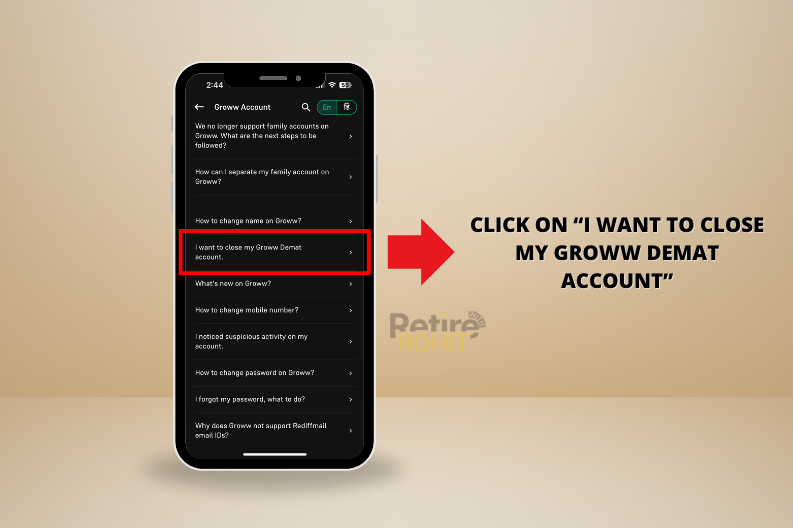
Navigate to “You” → “Help & Support” → “Account-related issues”. (LoansJagat)
-
Search for “Delete/Close Groww Account / Demat Account Closure.” (A Digital Blogger)
-
Select the option to close the account. You may be asked to fill a form — provide necessary details such as name, client ID / DP ID / Client ID (as applicable), reason for closure, and your bank details for settlement or refunds. (Groww Resources)
-
Submit the request.
After submission, Groww will process it. According to recent user‑help guides, closure usually completes in about 5–15 business days depending on pending holdings, verifications, or bank processing. (TradingCritique)
Method 2: Submit Account Closure Form (PDF)
If you prefer manual process or lose access to the app/website:
-
Download the “Equity / Demat Account Closure Form” (available on Groww’s site). (Groww Resources)
-
Fill in details like DP ID, Client ID, name, address, holdings status (should be empty), and instructions for settlement or transfer of any residual holding/balance. (Groww Resources)
-
Sign the form and send it to Groww’s registered office address (as mentioned on the form). (Groww Resources)
Note: This method is more formal/traditional, usually used when app/website not accessible. Processing times can be longer (e.g. 10–12 business days as per older info) (A Digital Blogger)
Method 3: Contact Groww Support / Raise Ticket / Email
Some users (especially when facing issues) prefer to raise a support request through in‑app ticket or email, explaining that they want to delete their account. Include your registered mobile number, PAN (or DP details), full name, and reason for deletion. (LoansJagat)
Groww support usually replies in a few business days; they may require additional verification before proceeding. (LoansJagat)
What Happens After Deletion — What to Expect
Once your deletion request is accepted and processed:
-
Your Demat / trading account will be permanently closed; you will no longer be able to login or trade. (TradingCritique)
-
Linked bank accounts, UPI mandates, and other payment mandates will be delinked. (TradingCritique)
-
Your PAN / Aadhaar / KYC details will be removed from active Groww records (though Groww may retain anonymised records for compliance). (TradingCritique)
-
You may receive a “closure statement” or confirmation email. It’s wise to keep that as proof of closure. (Invest Guru India)
-
If you want to re‑open Groww account: there’s usually a cooling period — for example, if you close the Demat account linked to a PAN, you might have to wait 5–7 days before opening a new account with the same PAN. (TradingCritique)
Common Problems / What to Watch Out For
Even after following the steps, some users find their deletion request delayed or rejected. Here are common pitfalls:
-
Holdings not cleared properly — if even a small security, mutual fund unit, or fund balance remains, closure may be blocked. (Invest Guru India)
-
Active SIPs or AutoPay not cancelled — these often prevent bank‑account unlinking or overall account deletion. (LoansJagat)
-
Only one bank account linked — some banks can’t be deleted alone; you may need to add a new bank first, then delete the old. (Groww)
-
Incomplete or incorrect closure form (wrong Client ID / DP ID / missing signature). Always double‑check before submission. (Groww Resources)
-
Pending dues, AMC, or unsettled orders — can delay closure or lead to rejection. (Invest Guru India)
If closure fails or you still get notifications, you may need to follow up via support or raise a complaint.
Alternatives to Permanent Deletion
If you are unsure about closing your account completely, you can consider:
-
Simply logging out and uninstalling the app — though this does not stop SIPs or auto‑payments. Many users mistakenly assume this suffices, but automatic debits may continue. (reddit.com)
-
Freezing or deactivating the account temporarily — some brokers (or Groww itself) may offer options to “freeze” the account, though this depends on current platform policies. (Groww)
-
Transfers: Instead of selling holdings, you may explore transferring assets to another Demat account (if supported) — but this can be complex and must comply with brokerage/Demat rules.
Step-by-Step Summary: Delete Groww Account
Here’s a quick checklist before you press delete:
| ✅ Step | Description |
|---|---|
| Sell/transfer all holdings (stocks, MF, ETFs) | Account must be empty |
| Cancel all SIPs / AutoPay / UPI mandates | No pending auto‑payments |
| Withdraw any remaining balance | No money left behind |
| Download statements, tax docs | For future reference |
| Ensure no pending orders or dues | Avoid rejections |
| Submit closure request via app / form / support | Use correct details (DP ID, Client ID, etc.) |
| Wait for processing (5–15 business days) | Closure confirmation will come |
Conclusion
Deleting a Groww account is possible — but it’s not instantaneous. It requires careful preparation: clearing investments, canceling payments, withdrawing funds, downloading records, and then formally submitting a closure request. If done carefully, the closure process is free, and you get a clean exit without hidden charges.
However, because there are many “moving parts” (holdings, SIPs, bank links, verifications), it’s important to follow each step methodically. If you skip even one, you might face delays — or risk getting stuck with unexpected fees or auto‑deductions.
If you decide to delete your account now, follow the checklist above. And if you need — I can also help draft a sample email or support message for Groww account deletion request.