
Why Edit Videos Online — and Why Free Tools Make Sense
Nowadays, video content is everywhere: social media, YouTube, work presentations, online courses, and more. But not everyone has access to expensive video‑editing software or a powerful computer. That’s where free online video editors come in — they let you create and polish videos right from your browser, without installing heavy software.
Because these tools run in a browser, they are accessible from any device (desktop, laptop, even tablet) with an internet connection. This makes them very convenient, especially for creators on a budget or for quick editing jobs. (Reelmind)
For many users — hobbyists, students, small creators — free online editors are plenty good. They handle basics like trimming, cutting, adding text, overlaying music, adjusting clip order — often all via drag‑and‑drop and simple interfaces. (Reelmind)

What to Keep in Mind: Pros and Cons of Free Online Editors
Free online video editors come with real benefits, but also limitations. It helps to know both sides before you pick a tool.
✅ Pros
-
No installation needed, works on browser — You can edit videos on any computer with internet. No software download or installation hassle. (Reelmind)
-
Easy to use — Many tools have drag‑and‑drop interfaces, pre-made templates, and intuitive controls — great for beginners. (Technadvice)
-
Accessible from anywhere, cloud-based/online storage (sometimes) — Projects may be saved online, allowing access from different devices. (Finchley Studios)
-
Good for simple and social‑media‑ready videos — For quick edits, intros, social posts, short clips, tutorials, etc., these tools are often more than enough. (Clipchamp)
-
Free or freemium — Basic editing features are often free; you can start without paying anything. (Reelmind)
⚠️ Cons / Limitations
-
Limited advanced features — Many free editors lack professional‑level features like advanced color grading, complex effects, detailed motion tracking, multi-layer editing. (Finchley Studios)
-
Dependence on internet / browser performance — Because everything runs online, slow internet or browser issues can cause lag, delays or failed exports. (Finchley Studios)
-
Export/resolution limits or watermarks — Some free plans limit export resolution, video length, or may add watermarks unless you upgrade. (Reelmind)
-
Less control for pros — If you want fine‑tuned control (color correction, audio mastering, visual effects), free tools may fall short compared to dedicated desktop editors. (Reelmind)
-
Privacy / dependency on cloud — Uploading videos to online servers may raise privacy concerns; and if the platform changes policy or shuts down, you might lose projects. (Finchley Studios)
So — free online editors are brilliant for many tasks, but not perfect for every need. If you only want to edit short videos, make social‑media clips, or do simple things, they work great. If you're making more serious or long-form content, you might someday need a more robust solution.
Some of the Best Free Online Video Editors (2025)
Here are some of the most popular, useful free video‑editing tools available online today. Each has strengths depending on what you need.
Clipchamp (by Microsoft)
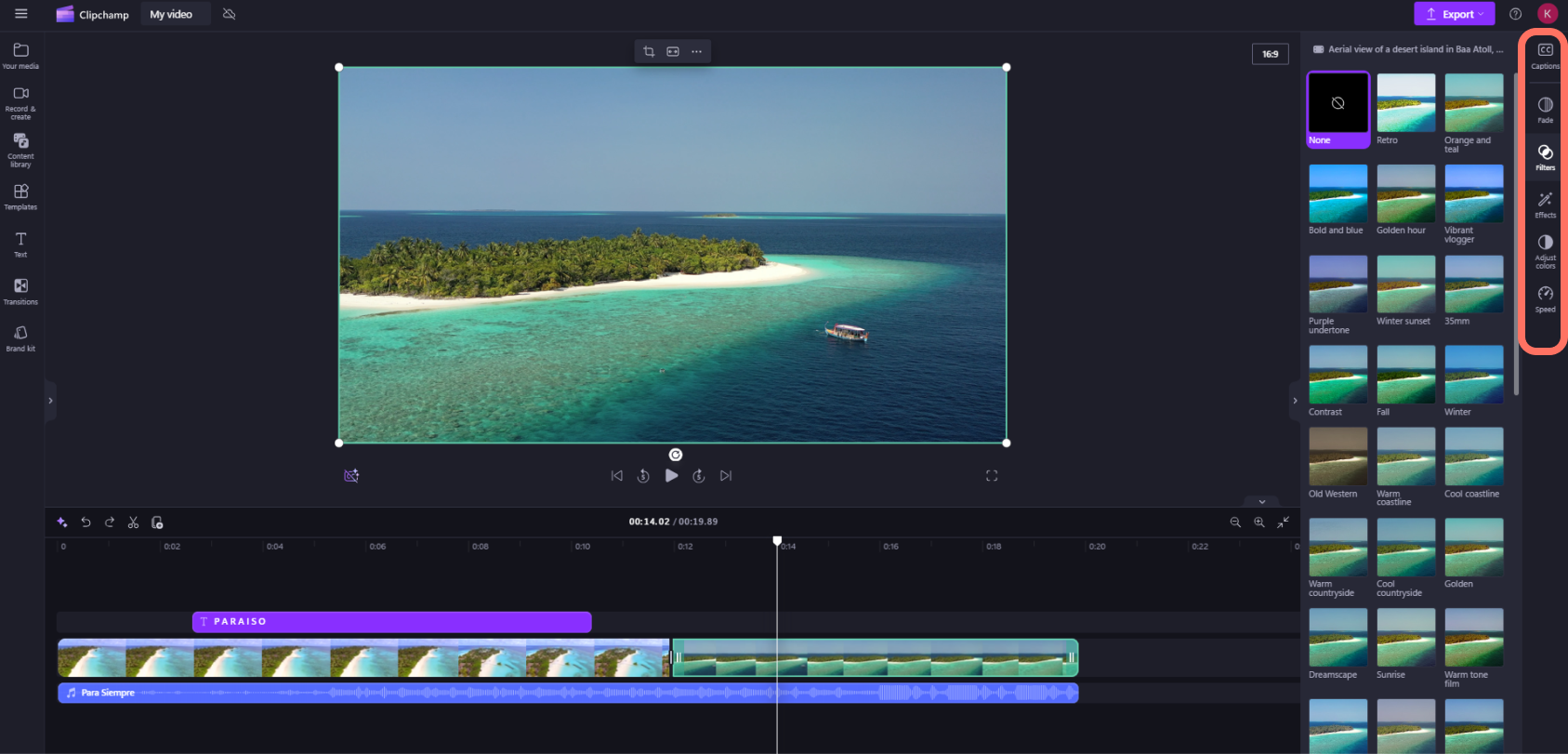
Clipchamp is one of the most widely used browser-based video editors. It works right in a web browser — no software installation needed. (Wikipedia)
You can upload video clips, trim them, rearrange scenes, add text or titles, insert music or voiceovers, and use templates. Clipchamp also provides a library of royalty-free video clips, images, and music — handy if you don’t have your own footage. (Clipchamp)
For many users, the free plan suffices: you can export in Full HD (1080p) without watermark, making it great for social media, YouTube, presentations, or simple vlogs. (Norrisgraphy)
Clipchamp also offers extra features like built-in screen recording, webcam recording, voice-over or text-to-speech — useful for tutorials or commentary videos. (Clipchamp)
Best for: beginners, Windows users, social‑media content creators, teachers, vloggers.
VEED.io
VEED.io is another popular online video editor that leans toward simplicity and speed. It offers a drag-and-drop interface and basic editing tools — trim, crop, rotate, add text or music, and apply filters or transitions. (VEED.IO)
What makes VEED attractive is some more advanced‑feeling features even in its free plan: for example, adding subtitles automatically, cleaning up audio, or even removing background noise. These features help make videos more professional, especially if they include voice‑overs or spoken content. (VEED.IO)
VEED is also helpful if you want to repurpose longer footage into shorter clips — for example, you recorded a long talk and want to extract only highlight sections. Many creators find that convenient for social media clips, promos, or tutorials. (VEED.IO)
Best for: educators, social‑media creators, people doing interviews or voice‑overs, those needing simple editing + subtitles/noise‑cleaning.
Adobe Express (formerly Adobe Spark / video‑editor in browser)
Adobe Express offers an easy-to-use video editor that runs in your browser. You can upload media, or start from a template to build your video project. It supports trimming, cropping, splitting scenes — basically the core editing tasks. (Adobe)
It’s especially good if you want to produce visually polished videos with minimal effort: you can add animated text, overlays, icons, background music (from Adobe’s free stock), or your own media, and then download the final video as MP4. (Adobe)
Moreover, Adobe Express makes it easy to resize videos for different platforms — so if you’re making content for Instagram, TikTok, YouTube, or Facebook, you can prepare suitable formats confidently. (Adobe)
Best for: beginners who want polished, template‑based videos; small business promos; social media content; presentations.
Other Tools Mentioned by Experts / Roundups
In broader lists of free editors, there are several more names worth knowing: (Technadvice)
-
InVideo — Cloud-based, template-rich editor, good for quick video creation, social media clips, or marketing videos. (Riverside)
-
WeVideo — Offers multi‑track editing, text overlays, transitions, and is suited for collaborative or educational video projects. (Queen of Treasures)
-
Canva Video Editor — More known for graphics, but its video editing side is useful for creating social media posts, slideshows, and simple video content without heavy editing. (Norrisgraphy)
These tools may not be as full-featured as dedicated desktop editors; but their ease and accessibility make them very appealing when you just need a clean, quick video.
Who Should Use Free Online Editors — and Who Should Avoid Them
Free online editors are a great fit when:
-
You are a beginner or occasional video maker — you just need simple trims, cuts, text overlays, or quick social‑media videos.
-
You don’t have a powerful PC or you don’t want to install heavy software.
-
You need to edit from different devices or locations, and want access from browser.
-
You prefer speed and convenience over deep customization.
-
You’re making short clips for social media, tutorials, presentations, or small projects.
But you may want to avoid relying on them if:
-
You want advanced features like color grading, fine‑tuned audio mixing, 4K/60 fps editing, VFX, motion tracking, etc.
-
You are making long‑form content (films, documentaries, professional-level videos).
-
You have sensitive content and worry about privacy or upload storage.
-
You need complete control over the timeline, multiple video & audio tracks, or heavy editing workflows.
In those cases, desktop video‑editing software (free or paid) might be more appropriate — but for many everyday needs, free online tools hit the sweet spot.
Quick Advice: How to Choose the Right Tool
When deciding which free online video editor to use, think about what you need the most. Here’s a rough guideline:
-
Need simple editing, trimming, and social‑media posts → Try Clipchamp or Adobe Express
-
Need subtitles, automatic audio cleanup, easy editing of interviews or tutorials → Try VEED.io
-
Need template‑based video for marketing, presentations, or business → Try InVideo or Canva Video Editor
-
Collaborative or educational video work, multiple tracks, mix content types → Try WeVideo
Also — consider your internet and system. Since these run in browser, a stable internet connection helps, and more complex edits might feel smoother if your computer is decently powerful.
Finally — don’t expect miracles. Free tools are amazing for what they offer, but they don’t replace full-featured desktop editors when you need advanced editing power.
Conclusion: Free Is Great — Especially for Everyday Video Editing
Free online video‑editing tools have come a long way. In 2025, with options like Clipchamp, VEED.io, Adobe Express, InVideo, and others, you can craft clean, polished videos without spending a rupee or installing heavy software. For social‑media creators, students, educators, small businesses, or anyone with occasional video‑editing needs — they are often more than enough.
They offer convenience, flexibility, and ease. They lower the barrier to content creation, opening possibilities even for those without technical or professional editing background.
Still, they have limits: for complex, professional‑level editing, or highly customized work — a more powerful tool or software may be needed.
If you ask me, free online editors are best seen as a first step — perfect for quick jobs, small projects, or testing ideas. And when you grow into bigger projects or need more control, you’ll know what to look for.