
Millions of people use Instagram to share photos, videos, stories, and connect with friends. But sometimes, you may want to leave — maybe permanently, or just take a break. In this post, I’ll show you how to delete or deactivate your Instagram account step by step. I’ll also explain what really happens to your data.

✅ Why it’s Important to Know This
-
If you delete your Instagram account, all your photos, videos, comments, likes, followers — everything — will be removed. (facebook.com)
-
Once deleted, you cannot get the same account back. (Gadgets 360)
-
If you only want to take a break but maybe come back later, you can temporarily deactivate instead. (Kaspersky India)
-
Instagram does not offer the “delete account” option from inside the mobile app. You must use a web browser (on phone or computer). (The Indian Express)
Hence — before you take any step, think carefully. If you feel ready, follow the procedure below.
🔧 Step-by-Step: How to Permanently Delete Instagram Account
If you are sure you want to leave Instagram forever, follow these steps:
-
Open a web browser (on your phone or computer) — not the Instagram app.
-
Go to the official deletion page:
https://www.instagram.com/accounts/remove/request/permanent/(The Indian Express) -
Log in to the Instagram account you want to delete (if you’re not already logged in). (India Today)
-
You’ll see a dropdown asking “Why are you deleting your account?” — choose a reason. Without selecting a reason, the delete option will not appear. (India Today)
-
Re‑enter your password. This is to confirm that you really own the account. (India Today)
-
Finally, click “Permanently delete my account”. Confirm if asked. (The Indian Express)
⚠️ Once you do this, your account, posts, profile, followers, everything will be deleted — and you won’t be able to recover them. (Gadgets 360)
What happens after deletion
-
After you confirm deletion, there is generally a grace period of ~30 days, during which your account is deactivated (others won’t see it). (Security.org)
-
If you log in again within those 30 days, the deletion request is cancelled — your account stays. (McAfee)
-
If you don’t log in during that time, after 30 days, your account will be permanently erased. But — full deletion may take up to 90 more days from Instagram’s side (for their backup systems). (facebook.com)
-
After permanent deletion, you cannot get back the same account, posts, follows, etc. Your username may become available again (depending on Instagram policy). (facebook.com)
Recommended: Backup Your Data First
Before deleting, if you have photos, videos, messages that you care about — download them. Instagram offers a “Download Your Information” tool (via web browser) so you can get a complete copy of your data: posts, stories, DMs, etc. (McAfee)
Once account is deleted, you won’t be able to use that tool again, so this backup is your only chance. (Kaspersky India)
🛑 Want a Break — How to Temporarily Deactivate Instead
If you’re not ready to permanently leave — maybe you just want a break — you can temporarily disable your account. That way, your profile & posts remain saved, but hidden from others.
Steps to deactivate:
-
Open a browser (phone or PC) and log into your Instagram account. (Kaspersky India)
-
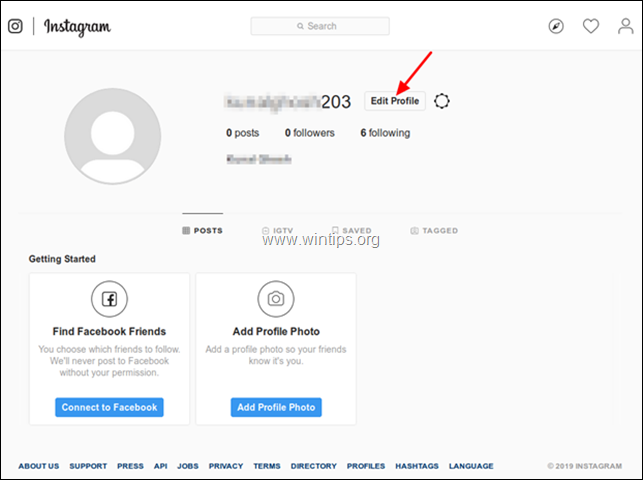
Go to your Profile → click Edit Profile. (Kaspersky India)
-
Scroll down and look for “Temporarily disable my account” (usually at bottom). Click it. (The Indian Express)
-
Choose a reason for disabling, re‑enter your password, and click “Temporarily Disable Account”. (India Today)
Once deactivated:
-
Your profile, posts, comments, likes are hidden — no one can see them. (Kaspersky India)
-
You can reactivate at any time simply by logging in — everything will be restored. (India Today)
This is a good choice if you want a pause from social media without losing everything forever.
⚠️ Some Common Questions & Things to Keep in Mind
| Question / Concern | Answer / Explanation |
|---|---|
| Can I delete via Instagram mobile app? | No — deletion (or deactivation) must be done via a web browser (on phone or PC). (The Indian Express) |
| What if I forget my password? | You’ll have to recover/reset password first. Without login access, you cannot request deletion. (India Today) |
| Will my DMs vanish for other people? | Your messages may remain visible to recipients, but your profile link/displayer may change (often becomes “Instagram User”). (McAfee) |
| Can I get account back after deletion? | Only if you log in within the 30‑day grace period. After that — no. (Digit) |
| Is deletion immediate? | No — after deletion request, account becomes invisible first; full server-level deletion can take up to 90 days. (facebook.com) |
💡 What to Do Before You Delete — Checklist
-
Backup your photos, videos, messages using the “Download Your Information” tool. (McAfee)
-
Decide: Do you want to leave forever, or just take a break? If unsure, deactivate first.
-
Make sure you remember login credentials (password, email/username) — or reset them before starting.
-
Once you hit “Permanently Delete,” don’t log in again (or the deletion will be cancelled).
✅ Conclusion
Deleting your Instagram account is a big decision. It can give you privacy, freedom from distractions, or a fresh start. But once done, everything is gone — permanently (unless you act within 30 days). If you are not 100% sure, consider temporary deactivation — it hides your profile without erasing everything.
By following the steps above carefully — backing up your data, using a browser, selecting a reason, entering password — you can delete or deactivate your account safely.