
When you use Instagram, there’s a feature called Activity Status. If it’s ON, people you follow or people you’ve messaged can see when you were last active — or whether you’re currently online.
That often shows up as a small green dot next to your profile picture in Direct Messages (DMs) or in lists where your contacts appear. (InstaHero24)
Some people like this — it lets friends know when you’re available to chat. But others prefer privacy: maybe they want to browse without the social pressure of “being online,” or just don’t want others to know when they were last active. If you also don’t want to see when others were active, you can turn this off — and that’s what we’ll learn now.
How to Turn Off Active Status on Instagram — Step by Step
Whether you use Instagram on Android, iPhone, or the web, you can disable this feature. Here’s how (as of the latest update):

-
Open the Instagram app and log in (if not already). (SocialBoosting)
-
Tap your profile icon — usually at the bottom right. (Instasize)
-
Tap the menu icon (three horizontal lines “☰”) — usually top‑right. (IQSaved)
-
Go to Settings and privacy (or only “Settings,” depending on version). (TechRadar)
-
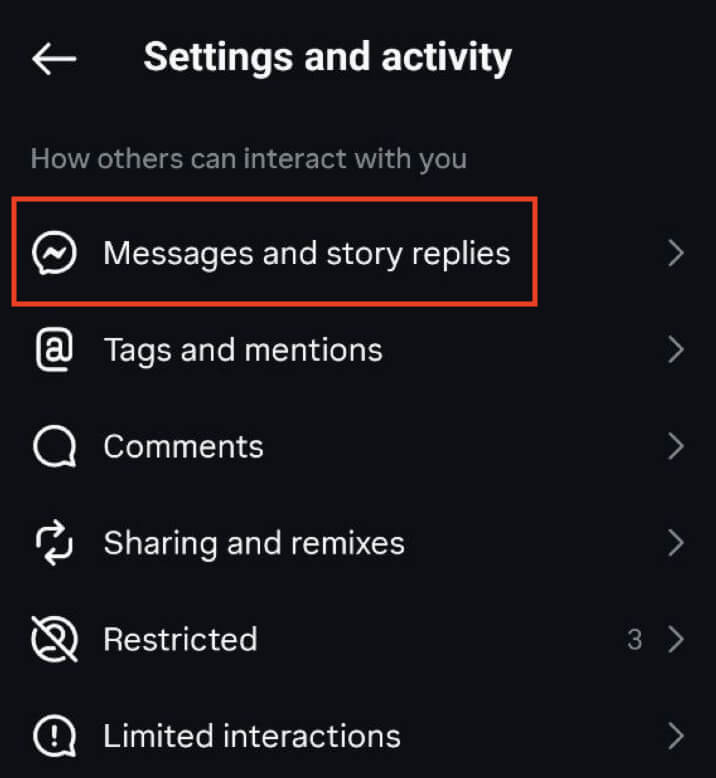
Scroll (if needed) and tap Messages and story replies. (facebook.com)
-
Tap Show activity status (or “Activity Status”). (Instasize)
-
Toggle OFF “Show Activity Status.” The switch should turn grey (or white), indicating the status is disabled. (Yahoo Tech)
-
Close settings — changes save automatically. You’re now “invisible”: others won’t see when you’re online or when you were last online. (facebook.com)
💻 On Desktop / Web (instagram.com)
-
Open a browser, go to instagram.com and log in. (TechRadar)
-
On the left (or top) menu, click More (or the three‑line menu) → go to Settings (or “Settings & Privacy”). (facebook.com)
-
Find Messages and story replies (or “Privacy / Activity Status,” depending on layout). (9meters)
-
Click Show Activity Status. Turn the toggle OFF. (facebook.com)
-
Done — your active status is now disabled on web too. (IQSaved)
What Happens After You Switch Off Active Status
-
People you follow — or people you’ve messaged — can no longer see when you were last active or whether you are online currently. The green dot / “Active now” indicator disappears. (Yahoo Tech)
-
On the flip side — you also won’t see when others are active. The feature works both ways. (facebook.com)
-
You can still use Instagram normally — browse feed, watch stories, message people — nothing else changes. Only the visibility of your online status is affected. (InstaHero24)
-
Since this is a global toggle (not per-person), you can’t choose to hide status from just a few people. Once off, it’s off for everyone. (TinyGrab)
Reasons to Turn Off Active Status — and When It Makes Sense
Turning off active status can be useful when:
-
✅ You want privacy — maybe you’re online but don’t want everyone to know.
-
✅ You want freedom to scroll or browse without social pressure — sometimes people feel obligated to respond if they see you’re “online.”
-
✅ You want to avoid distractions — hiding your status may reduce expectations of instant replies.
-
✅ You value control over who sees your activity; especially if you use Instagram for personal and professional reasons.
Basically, turning off this feature gives you a quieter, more private Instagram experience.
A Few Things to Keep in Mind
-
This setting applies to your entire account — not per‑contact. So you can’t hide from some and show to others. (9meters)
-
Once disabled, you also lose the ability to see when others are online or their “last active” time. (facebook.com)
-
Occasionally, after app updates, settings layout can change. If you don’t see “Messages and story replies,” check under “Privacy,” or use search in Settings. (IQSaved)
Conclusion — Should You Hide Your Active Status?
If you value privacy or simply want to use Instagram without feeling “on‑call,” then turning off active status is a great idea. It’s easy, quick, reversible, and gives you more control over your online presence. On the other hand, if you often chat with friends or want them to know when you’re available, you might keep it on.
Ultimately — it depends on what you want from Instagram. For many people these days, privacy and peace of mind matter more than showing “online status.”