
Cloud CRM (Customer Relationship Management) software is a web‑based platform — hosted on remote servers (“in the cloud”) — that helps businesses manage their interactions with customers, leads, sales, and customer support. Unlike traditional CRM systems which require you to install software on your own computers or servers, cloud CRM simply works via internet and a web browser (or mobile app). (Salesforce)
For a small business, this means you don’t have to worry about buying expensive servers, hardware, or hiring a dedicated IT team to install and maintain the CRM system. Cloud CRM is ready to use — often on a subscription (monthly/yearly) basis — which makes it much easier and lighter to adopt. (Salesforce)
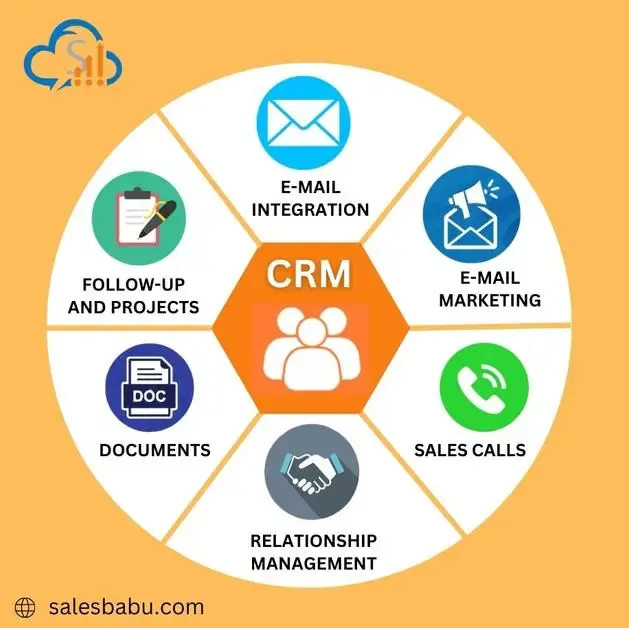
Why Small Businesses Should Use Cloud CRM
Cloud CRM offers several compelling advantages for small businesses. Let’s dive into the main reasons.

1. Low Cost & Scalability
-
Lower upfront investment: Because you’re not buying hardware or servers, cloud CRM removes heavy capital expense. You pay subscription fees instead. (Salesforce)
-
Pay as you grow: As your business grows — more customers, more staff — you can scale your CRM plan. If things are slow, you don’t have to pay for features you don’t use. This flexibility is crucial for small or growing businesses. (Arobit)
2. Access From Anywhere — Flexibility & Mobility
Cloud CRM lives in the internet/cloud. That means you (or your team) can access customer data, leads, sales pipelines, support tickets — basically everything — from anywhere: office, home, on the move, even using a smartphone or tablet. This is ideal if your team is remote, on field, or distributed. (technologyevaluation.com)
This flexibility lets small businesses stay agile. Teams can update data in real time, collaborate effectively, or respond to customers quickly — even outside the traditional office. (NASSCOM Community)
3. Centralized Customer Data & Improved Customer Insights
With cloud CRM, all customer-related data — contact info, communication history, purchase records, support requests — are stored in one central place. This ensures that no matter who from your team interacts with a customer, they have access to the full history. (cloudeagle.ai)
This unified view helps you understand customer behavior, purchase patterns, preferences — giving you actionable insights. You can track which customers are frequent, which are at risk of dropping, or who might respond to upsell/cross‑sell offers. (appdid.com)
Such insights help you create personalized communication, offers, or support — improving customer satisfaction and loyalty. (katleads.com)
4. Improved Team Collaboration & Productivity
Since data is stored in the cloud and all teams access the same database, collaboration across sales, marketing, and support becomes much more streamlined. No more disconnected spreadsheets, duplicate data entries, or lost information. (technologyevaluation.com)
Also, many cloud CRMs come with automation features — e.g., automatic follow‑up reminders, email templates, lead assignment, task tracking — which reduces repetitive manual work. This frees up time for your team to focus on more important tasks, like closing deals or building relationships. (cloudeagle.ai)
5. Security, Reliability & Maintenance Handled by Provider
Good cloud CRM providers handle security: data encryption, secure backups, updates, patches — all done on their end. For a small business that may not have strong IT infrastructure, this is a big plus. (technologyevaluation.com)
Because the provider manages maintenance and upgrades, you don’t need to dedicate staff or time — and you always get the latest features, bug fixes without downtime or extra effort. (Salesforce)
What Features Should You Expect in Cloud CRM?
If you're evaluating cloud CRM software for your small business, here are some commonly offered features you should look for:
-
Contact and lead management: Store customer/contact details, lead sources, status, interactions.
-
Sales pipeline management: See where each lead/customer is in the sales funnel; track progress, deals, conversions.
-
Communication history & logs: Emails, calls, meetings, support tickets — centralized history of all interactions.
-
Automation tools: Automated follow‑up reminders, email campaigns, scheduling, lead assignments → reduces manual work. (cloudeagle.ai)
-
Analytics and reporting: Dashboard, reports on sales trends, customer behavior, conversion rates — helps data-driven decisions. (BuddyCRM)
-
Integrations: Ability to integrate with other tools your business already uses — email marketing, accounting, e‑commerce, helpdesk, etc. (webdew)
-
Access control and security: Secure login, data encryption, role-based access (important if multiple team members use it). (erpone.in)
Common Mistakes to Avoid When Using Cloud CRM
Using cloud CRM can be transformative — but only if used properly. Here are some pitfalls small businesses often make (or should avoid):
-
Overcomplicating workflows: Trying to replicate complex processes from day one can overwhelm your team. It’s better to start simple and gradually build. (appdid.com)
-
Not training the team properly: If team members don’t know how to use CRM features effectively, CRM adoption and benefits will suffer. (appdid.com)
-
Ignoring data hygiene: Over time, duplicate or outdated records can pile up. Regular data cleaning and consistent data entry practices are key. (While not always explicitly stated, this is a common CRM‑management best practice.)
-
Using CRM as just a database — not as a tool for customer relationships: CRM offers more than data storage — use it for follow-ups, customer engagement, personalized marketing/service.
How Cloud CRM Helps Indian Small Businesses (or SMEs in general)
For small businesses in countries like India — where budgets are tight, teams are small, and flexibility is often needed — cloud CRM can be especially useful.
-
No big upfront cost: Since small firms rarely have large budgets for IT infra, subscription‑based cloud CRM helps avoid heavy capital investments. (Salesforce)
-
Flexibility for remote work and field‑based sales: Many SMEs in India operate through sales agents on field, or have small offices — cloud CRM allows them to work from anywhere, record data from field visits, update lead status instantly, etc. (technologyevaluation.com)
-
Better customer management despite limited staff: Even a small team can manage customers, leads, support efficiently — without needing large staff or complex infrastructure. Cloud CRM essentially levels the playing field. (appdid.com)
-
Support for growth: As your business grows, customer base expands, CRM scales — you don’t have to switch tools or face downtime. (Arobit)
Choosing the Right Cloud CRM — What to Check Before You Commit
When selecting a cloud CRM for your small business, keep these points in mind:
-
Pricing / Plan Structure — Does it fit your current size? Is it scalable as you grow?
-
Essential Features vs Overkill — For a small business, you may not need very advanced features. Choose something simple, easy to use, and relevant to your needs.
-
Ease of Use / Onboarding Time — A CRM should be easy to adopt; complex CRMs may hinder usage by small teams.
-
Integration Capabilities — Ensure it integrates with other tools you already use (email, accounting software, e‑commerce platform, etc.).
-
Security & Data Backup — Make sure your provider offers data encryption, backups, and handles maintenance.
-
Support & Training Resources — For small teams, responsive support and easy documentation/multilingual support (if needed) can be important.
-
Scalability & Flexibility — As your customer base or team grows, CRM should scale accordingly.
Conclusion: Cloud CRM as a Growth Partner for Small Business
For many small businesses, especially those operating on tight budgets and limited IT resources, cloud CRM software is not just a convenience — it’s a strategic tool. It helps streamline customer data, sales processes, marketing, and support — and lets small teams operate efficiently without extra infrastructure.
Cloud CRM brings enterprise-grade customer relationship management within reach of small or medium‑sized businesses. With relatively low cost, easy accessibility, scalability and powerful features like automation and analytics — small business owners can manage leads better, make data-driven decisions, and deliver better customer experiences.
If you start with a simple setup, train your team properly, and use CRM as a tool for actual customer relationships (not just data storage) — cloud CRM can become a key driver of growth.