
In the world of stock market trading, charting software and trading platforms play a vital role. One of the widely known names in this space is ProRealTime — a platform that offers charting, technical analysis, market scanning and trading capabilities. The “ProRealTime: Stock Market Live” app is the mobile / live‑markets version, enabling traders to follow charts, watch live (or near‑live) data, and trade via their phones or other devices.
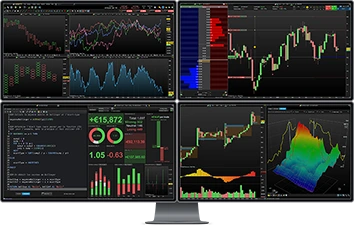
The rest of this blog will break down what ProRealTime offers, what you should know (pros and cons), and whether it makes sense to consider it — explained in simple English for clarity.
🔧 Key features of ProRealTime & What the App Offers
• Charting + Technical Analysis Tools
-
ProRealTime provides over 100 built‑in technical indicators (like moving averages, oscillators, etc.). You can also import extra indicators made by the user community or even create your own custom indicators using the platform’s own scripting language. (ProRealTime)
-
Charts are highly flexible: besides standard time‑based charts (minutes, hours, days), there are non-time-based chart types like tick‑by‑tick, volume‑based charts, and advanced chart styles (e.g. Renko, Point & Figure, Market Profile, etc.). (ProRealTime)
-
Drawing tools: Support/resistance, trend‑lines, Fibonacci, channels, and many others — for detailed technical analysis. (ProRealTime)
• Live Market Data & Multi‑Market Coverage
-
The app covers stocks, indices, Forex, cryptocurrencies, commodities, futures, ETFs, etc., giving a broad range of instruments to track. (App Store)
-
For US stocks (and some markets), there is real‑time data; for other markets there may be a slight delay unless you subscribe to premium data feeds. (App Store)
-
ProRealTime boasts direct connectivity to major exchanges, redundant data feeds, and robust infrastructure — essential for accurate, fast data and smooth trading. (ProRealTime)

• Trading From Charts & Order Management
-
You can place buy/sell orders directly from the chart interface — not just via separate order windows. This includes Market orders, Limit, Stop, OCO/OTO orders, trailing stops, and more complex order types (multi-leg, entry‑target‑stop combos). (ProRealTime)
-
Manage positions, set alerts on price levels or indicator conditions, and receive notifications on your phone — handy for traders on the go. (App Store)
• Market Scanning, Alerts & Automated Trading / Backtesting
-
A built‑in screener (called ProScreener) allows you to scan many securities based on price, technical indicators, volume, patterns — across multiple timeframes. This helps to spot trading opportunities quickly. (ProRealTime)
-
Historical data and backtesting: you can test strategies on past data before risking real money. This is useful if you want to build confidence or automate your trading plan. (ProRealTime)
-
Automation: For advanced users, ProRealTime allows building and running automated trading systems (algorithms) — enabling 24×7 execution if desired. (IG)
• Flexibility: Web, Desktop & Mobile Versions
-
ProRealTime is available as a web‑based platform, desktop installation, and mobile app — so you can access it from almost anywhere. (ProRealTime)
-
Your charts, settings, watchlists sync across devices. (ProRealTime)
✅ What Makes ProRealTime Good — Strengths
-
Comprehensive tools for both beginners and advanced traders: Whether you’re just studying charts or building automated strategies, ProRealTime gives flexibility. (ProRealTime)
-
Broad market/data coverage + good infrastructure: Reliable data feed, many instruments, historical data — helpful for global traders. (ProRealTime)
-
Chart‑based trading + strong drawing & analysis tools: For technical analysis enthusiasts, the charting system is very powerful and customizable. (ProRealTime)
-
Custom indicators & automation capabilities: If you are into coding your own strategies or custom chart tools — ProRealTime supports that. (ProRealTime)
-
Real‑time alerts & scanning: Helps you stay updated even when you’re not actively watching — ideal in fast markets. (App Store)
⚠️ Things to Keep in Mind — Limitations and Criticism
-
Live data not always free for all markets: US stocks may be real-time, but many other exchanges have delayed data unless you pay for a subscription. (App Store)
-
Learning curve: With lots of tools, options, and possibilities, beginners may find it overwhelming. Especially custom scripting, multi-timeframe analysis, automation features need some learning.
-
User reviews are mixed: Some users praise its flexibility and support, but others complain about performance issues (slow loading, bugs, interface complexity). (Trustpilot)
-
Costs for full functionality or inactivity: While the basic charting might be free (or cheaper), full functionality especially for trading via certain brokers, live data feed subscriptions, or if you don’t trade frequently — may incur fees. (IG)
-
Not always best for all types of trading: For casual investors or long‑term buy‑and‑hold investors, such heavy‑duty technical analysis may be more than needed (and complex).
🎯 Who Should Use ProRealTime — Who It’s Best For
Based on its strengths and limitations, ProRealTime suits best for:
-
Traders who do active technical analysis — day traders, swing traders, technical analysts.
-
People who want multi‑market exposure (stocks, Forex, futures, cryptos) and need a single platform.
-
Users comfortable with charting, indicators, custom scripts, automation.
-
Traders who want real‑time alerts, scanning, multi‑timeframe analysis and want to manage their trades from anywhere (mobile + web + desktop).
If you are a casual investor — say someone who buys & holds stocks for long term — ProRealTime’s advanced features may not offer much added value over simpler brokerage or charting apps.
📱 What About the “ProRealTime: Stock Market Live” Mobile App
The mobile app (as listed — “ProRealTime: Stock Market Live”) brings the core functionalities to your phone: live charts/quotes, chart-based order placement, alerts, and support for various markets (stocks, crypto, Forex, gold/silver, futures, ETFs) depending on data access. (App Store)
This means you don’t have to be on a desktop to track markets — for many traders, that flexibility is a major plus. However, one should be aware that some data (depending on market) may be delayed unless a subscription is taken; and smaller screens of mobile devices may make complex charting or multi‑timeframe analysis less convenient.
🧩 My Take & What You Should Decide — Is ProRealTime Worth It?
If I were you — living in India but wanting to follow global markets, do technical analysis and maybe automate some trades — I’d consider ProRealTime only if I plan to commit enough time/effort (i.e. treat trading seriously).
-
Its tool‑set is powerful — you get a lot of flexibility: from simple charting to advanced automated strategies.
-
But it’s not plug‑and‑play. For someone just starting, I’d say explore the free / trial version first; learn charting basics, make sure data for the markets you care about is available (real‑time or acceptable delay), and gauge whether complexity is worth it.
-
If you are a long‑term “buy and hold” investor, simpler platforms might be enough; heavy charting might be overkill.
📝 Conclusion
ProRealTime — especially via its “Stock Market Live” app — offers a robust, flexible platform for anyone serious about technical charting, frequent trading, or automated strategies. With hundreds of indicators, custom scripting, multiple instrument coverage, and multi-device support, it can serve both beginners (willing to learn) and advanced traders.
But at the same time, it comes with complexity, potential costs (for data or inactivity), and a steeper learning curve. So before diving in, one should clearly understand goals.